

"jsoupis a Java library for working with real-world HTML. It provides a very convenient API for extracting and manipulating data, using the best of DOM, CSS, and jquery-like methods” – JSoup.org
Like in the description above provided by JSoup’s website, the JSoup library serves as a great tool when you want to extract and manipulate HTML data on a webpage. This blog post will go into depth about the basics of the API, as well as providing a few real-life examples of how to use the library.
How to set up the library
Before you can get started using the JSoup library, you actually need to download and add it to your project. For this tutorial, I will be using Eclipse.
To download the library, go on this page and download the core library jar file.
Once you’re done, create a new project in Eclipse like you usually do, and afterwards create a folder inside your project folder called “libs” and place the JSoup library jar file inside that folder.
All that’s left to do now is adding the JSoup jar as a library in the build path. This is pretty straightforward. In the menu bar, click Projects -> Properties -> Java Build Path -> Add Jars and add the jar in your libs folder. It’ll look like this:
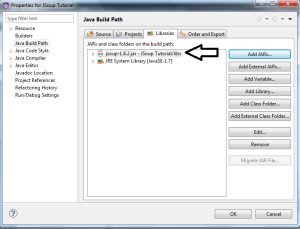
You’re all set!
The basics
Let’s start with the complete basics. When we want to fetch and parse the HTML content of a website, we’ll have to create an object of the Document class and then load the page. Loading the page is pretty straightforward. There are three ways to do this:
- Loading an HTML file from your computer
- Loading/fetching the HTML code from a URL
You can also write some HTML code inside a string and then parse it.
Loading HTML file from your computer
package com.alychidesigns.main;

import java.io.File;
import java.io.IOException;

import org.jsoup.Jsoup;
import org.jsoup.nodes.Document;

public class Main {

    private static final String path = "PATH HERE";

    private File file;

    public Main() {
        file = new File(path);
        try {
            Document doc = Jsoup.parse(file, "UTF-8", "");
            String title = doc.title();
            System.out.println(title);
        } catch (IOException e) {
            e.printStackTrace();
        }
    }

    public static void main(String[] args) {
        Main main = new Main();
    }

}
As you can see, the first thing we did was define a String constant containing the path to your HTML file, and an instance of the File class.
Inside the constructor, we initialized our file instance and put our path in its constructor’s parameters. Afterwards, we simply just created an instance of the Document class of the JSoup library and parsed the content of our HTML file.
We can then retrieve the title of our page by doing doc.title();.
Fetching and parsing HTML content via URL
package com.alychidesigns.main;

import java.io.IOException;

import org.jsoup.Jsoup;
import org.jsoup.nodes.Document;

public class Main {

    private static final String URL = "https://en.wikipedia.org/wiki/Main_Page";

    public Main() {
        Document doc;
        try {
            doc = Jsoup.connect(URL).get();
            String title = doc.title();
            System.out.println("Title of the webpage: "+title);
        } catch (IOException e) {
            e.printStackTrace();
        }
    }

    public static void main(String[] args) {
        Main main = new Main();
    }

}
This code snippet actually has fewer lines than the other. Unlike the previous example, you don’t use the parse method when fetching and parsing HTML content via a URL. Instead, you connect to the URL and then get() the HTML content of the webpage.
Only the loading part is different, the rest stays the same. Once you’ve loaded the HTML content, be it via URL or file, the rest of the code will be the same because you’ll either way be working with the instance of the Document class.
Now that you’ve learned how to load HTML content, it’s time to start working with it!
Working with the parsed HTML
Now that the parsing of the HTML is done, we can start doing the fun stuff! We’ve already worked a little bit with the parsed HTML. Remember in the previous examples where we retrieved the title of the webpage? Well, that’s only one of the many things you can do once you’ve parsed the HTML!
Retrieving values from elements
One of the most fundamental things in the JSoup API is the use of elements. If you didn’t already know, elements are basically everything from the start of a tag to the end of a tag.
An example of an element is:
<p>This whole thing is an element, not just the text between the paragraph tags</p>
Retrieving elements and their values is one of the easiest things in the world, which is what makes JSoup such a powerful and user-friendly library.
Here’s an example of a program that retrieves all <p> elements and then prints out all the values:
package com.alychidesigns.main;

import java.io.IOException;

import org.jsoup.Jsoup;
import org.jsoup.nodes.Document;
import org.jsoup.nodes.Element;
import org.jsoup.select.Elements;

public class Main {

    private static final String URL = "http://www.w3schools.com/html/html_elements.asp";

    public Main() {
        Document doc;
        try {
            doc = Jsoup.connect(URL).get();
            Elements paragraphs = doc.select("p");
            for (Element tmpElement : paragraphs) {
                System.out.println(tmpElement.text());
            }
        } catch (IOException e) {
            e.printStackTrace();
        }
    }

    public static void main(String[] args) {
        Main main = new Main();
    }

}
What I did is pretty straightforward. When you want to retrieve all elements of a certain type, such as <p> elements, you’ll have to create an instance of the Elements class and use the Document.select() method to “select” all the elements and retrieve them. After I selected all the elements, I just looped through every element and printed out the text in those elements.
But what do you do if you want to retrieve a single individual element from the HTML code? For instance, what if you want to retrieve the first paragraph element in the HTML code? In that case, you’ll have to create an instance of the Element class. See a pattern here?
Here’s a code snippet for retrieving the first paragraph element of the same website as in the last example:
package com.alychidesigns.main;

import java.io.IOException;

import org.jsoup.Jsoup;
import org.jsoup.nodes.Document;
import org.jsoup.nodes.Element;

public class Main {

    private static final String URL = "http://www.w3schools.com/html/html_elements.asp";

    public Main() {
        Document doc;
        try {
            doc = Jsoup.connect(URL).get();
            Element paragraph = doc.select("p").first();
            String text = paragraph.text();
            System.out.println(text);
        } catch (IOException e) {
            e.printStackTrace();
        }
    }

    public static void main(String[] args) {
        Main main = new Main();
    }

}
Here’s a list of the most useful methods in the Element class:
| Method | Type | Description | Example |
|---|---|---|---|
| html(); | String | Retrieves inner html of element | String inner = element.html(); |
| hasText(); | Boolean | Returns true if element has text in it that’s not whitespace | boolean hasText = element.hasText(); |
| id(); | String | Grabs the ID attribute of the element | String id = element.id(); |
| tagName(); | String | Gets the name of the tag for the element | String tagName = element.tagName(); |
| getElementById(String id); | Element | Find an element by its id | Element id = element.getElementById(“Example”); |
| text(String text); | Element | Set the text of the element | element.text(“Example”); |
If you want to get an overview of all the methods, you can go on this link to get to the documentation of the API.





