

Learn here the simple ways to use channel mixer in photoshop elements 12 and do hassle-free photo editing.
Today, we are talking about Adobe Photoshop Elements 12 which is of course a fairly priced editing photoshop elements tool that is not just for the amateurs but serves many advanced editing features as well.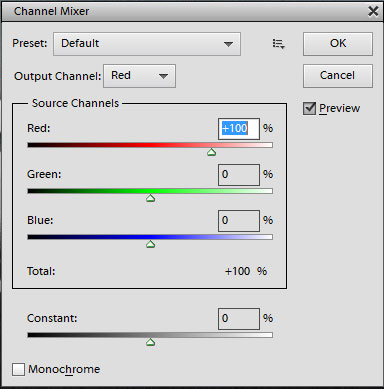
Though the previous versions of elements might not have the privilege of working in separate photoshop color channels and working with layers and mask, but this one bags in all the required features so that you need not purchase the expensive copy of Photoshop. The Photoshop Elements 12 has the features like Content Aware Move tool, pet-eye correction and Adobe revel but one more additional feature included in it is the Channel Mixer that was included in only Photoshop but not Elements previously.
The Channel Mixer option in Photoshop Elements 12 allows you to adjust the image by re-mixing image’s color channels. Using channel mixer photoshop you can access each color channel red, green and blue. Not only for the conversion into Black and White image but for enhancing color based details in the image this channel mixer comes in very handy to the users.
Channel Mixer for adjusting color ratios:
Open the channel mixer option from the Effects palette.
Now, in the output channel select the proper color channel. Suppose if you want to alter blue-to-yellow color ratio then select blue channel in output channel.
Adjust the color now using sliders present in Source Channels option. To fix blue cast you slide down to reduce the value and to remove yellow you increase the value. But Total percentage must be satisfied so change accordingly.
Channel Mixer to adjust layered image as a whole:
Since channel mixer in the Photoshop Elements can be used to edit only the current layer so to adjust the image as a whole follow these steps for the Channel Mixer Adjustment Layer
Select the uppermost layer (front layer) from the Layers palette.
Press Alt+Ctrl+Shift+E to merge all the layers into one new layer.
Now, edit this one layer with the channel mixer as shown above.
Channel Mixer for Black and White conversion:
For the B&W effects in the channel mixer dialog box select the bottom option “Monochrome”. The image will turn into grayscale.
Now, redistribute the luminance with different color channel sliders of Red, Blue and Green colors to produce the best tone for your image.
Though the above guides help you to work with the Channel Mixer of Photoshop Elements 12 but before this you should know how actually these individual color channels affect the image.
The different color channels in Channel Mixer and their use:
Red color channel
This color channel is for Contrast and often known as Contrast Channel. This one is the brightest channel with most contrast.
Green color channel
This channel is the Detail channel and is more like a B&W version of photographs. This particular channel contains the most information of image in it as human visual system is most sensitive to green color only.
Blue color channel
This color channel is known as the Noise channel. Therefore this channel is generally the darkest of all channels and contains most noise in it. The techniques of noise reduction for photographs are applied using this channel only.





